쿠버네티스란?
| kubernetes
줄여서 k8s로 부른다
컨테이너화된 애플리케이션 배포, 확장, 관리를 자동으로 처리해주는 오픈소스 플랫폼
-> 컨테이너가 수십개로 늘어나면서 관리를 해야했고, 이를 관리해주는 플랫폼이라고 생각하면 될 듯하다
| 컨테이너 오케스트레이션이 필요한 이유
물리 서버-> 가상머신 -> 컨테이너 로 발전된 애플리케이션 실행 환경으로 발전하였고,
하지만 컨테이너도 수십개로 증가하며 이를 관리해주는 오케스트레이션이 필요하게 됨
| 클라우드 도입 시 얻는 장점이란?
- 자가 치유
- 자동 확장
- 로드 밸런싱
- 자동 롤백
| 자가치유
컨테이너가 실행 중 갑자기 멈추면 쿠버네티스가 이를 자동으로 감지해서 재시작하거나 새 컨테이너로 교체
-> ReplicaSet이 항상 설정한 수의 pod를 유지하므로 일부에 문제가 생겨도 전체 서비스에는 영향이 없음
| ReplicaSet? pod?
- ReplicaSet = 일정 개수의 pod를 유지해주는 컨트롤러
- pod = 쿠버네티스가 생성하고 관리하는 가장 작은 컴퓨팅 단위
1개 이상의 리눅스 컨테이너로 구성되어있음
| 자동확장
사용자가 갑자기 몰리면, 컨테이너를 자동으로 늘림
- HPA(Horizontal Pod Autoscaler) -> pod수 담당
- VPA(Vertical Pod Autoscaler) -> pod의 리소스 할당
- Cluster Autoscaler -> 노드수 담당
=> 트래픽이 줄면, 불필요한 리소스를 줄여 비용을 절약함
| 로드 밸런싱
트래픽을 여러 컨테이너에 골고루 분배함
| 자동 롤백
새로운 버전을 배포할 때. 다양한 무중단 배포 전략 지원
안전한 버전으로 롤백 가능함
쿠버네티스 4가지 핵심 구성요소
- 컨트롤 플레인, 워커 노드(control plane. worker node)
- pod
- deployment
- service
| 컨트롤 플레인과 워커 노드, 전체 시스템을 관리하는 두뇌와 일꾼의 구조
클러스터는 여러 개의 node로 구성 + Control plane 과 worker node로 나뉨
| control plane
-> 두뇌의 역할을 수행함
- kube-scheduler: 어떤 작업을 어느 노드에 배치할지 결정
- kube-controller-manager: 전체 시스템의 상태를 모니터링하고, 현재 상태를 원하는 상태로 맞추는 역할
- kube-api-server: kubectl로부터 API 요청을 받아서 처리함
- etcd: 클러스터의 모든 설정 데이터 저장
| worker node
-> 일꾼 역할 수행함
control plane이 내린 명령에 따라 실제 컨테이너를 실행하고 애플리케이션을 구동함
| pod
-> 일꾼이 처리하는 최소 단위 업무
쿠버네티스의 최소 배포 단위
- 1 pod, 1개 이상의 컨테이너
- 같은 pod내 컨테이너들은 같은 IP와 저장공간을 공유
| deployment
-> pod를 몇개 유지하라는 명령어
ex)
이 pod는 항상 3개 유지하라면 컨테이너가 죽어도 새로 생성하면서 유지함
내부적으로는 ReplicaSet이 파드 수를 관리하며, 업데이트 관리
| Service
-> 외부 노출과 고정 주소
- pod는 생성되고 삭제될 때 IP주소가 바뀜
- service는 pod앞에 고정된 접근 주소를 부여해서 항상 일관된 방식으로 접근할 수 있도록 함
Docker 와 kubernetes
-
도커
컨테이너를 만드는 도구 -
쿠버네티스
컨테이너를 관리하는 도구
Online Boutique 기반 쿠버네티스 공부하기
https://github.com/GoogleCloudPlatform/microservices-demo
-> 해당 github를 통해 학습하며 yaml 파일을 공부했습니다
| frontend.yaml 파일
# Copyright 2018 Google LLC
#
# Licensed under the Apache License, Version 2.0 (the "License");
# you may not use this file except in compliance with the License.
# You may obtain a copy of the License at
#
#      http://www.apache.org/licenses/LICENSE-2.0
#
# Unless required by applicable law or agreed to in writing, software
# distributed under the License is distributed on an "AS IS" BASIS,
# WITHOUT WARRANTIES OR CONDITIONS OF ANY KIND, either express or implied.
# See the License for the specific language governing permissions and
# limitations under the License.

# Q. kind가 여러 종류 있는데, Deployment는 어떤 역할을 하는 오브젝트일까?
apiVersion: apps/v1
kind: Deployment # pod를 몇개 유지하라는 명령어
metadata:  # 해당 리소스에 대한 식별 정보가 들어있다.
  name: frontend
  labels:
    app: frontend        # Q. 이 label은 누가, 왜 사용할까? -> frontend라는  label을 사용
spec: # 리소스가 원하는 상태가 무엇인지를 설명해준다. 설계도라고 생각하면 편한다
  selector: # 이 배포가 어떤 pod를 관리할 것인가
    matchLabels: # matchLabels가 frontend인 것을 보아 frontend를 관리하는 것으로 보인다
      app: frontend      # Q. 위의 labels.app: frontend 와 같은 값 — 우연일까 의도일까?
  template:              # Q. template 아래가 실제 Pod 정의 — Deployment와 Pod는 어떤 관계일까?
                        # template는 실제 띄울  pod의 상세 설정을 나타냄
                        # Deployment는 pod를 몇개 유지하라는 명령어이고 metadata에 해당 이름을 넣고
                        # spec에서 어떤 pod를 관리할지 label이 frontend인 것을 관리하는 것으로 적었고
                        # template 에서 실제 pod에 대한 상세한 설명을 작성하는 것이다.
    metadata:
      labels:
        app: frontend  # pod의 label을 명시해주고
      annotations:
        sidecar.istio.io/rewriteAppHTTPProbers: "true" # Istio가 HTTP probe를 HTTPS로 재작성하는 설정 (mTLS와 직접 관련 없음)
    spec:
      serviceAccountName: frontend # 해당 pod가 쿠버네티스 안 에서 가길 identity
      securityContext: # 컨테이너가 실행되는 OS수준 제어
        fsGroup: 1000 # 컨테니어 내부 프로세스 사용자의 수준을 1000으로 고정
        runAsGroup: 1000
        runAsNonRoot: true
        runAsUser: 1000
      containers: # 이제 어떤 컨테이너를 pod로 실행할지 확인할 수 있음
        - name: server
          securityContext:
            allowPrivilegeEscalation: false # 자식 프로세스가 부모 프로세스보다 더 높은 권환을 갖는 것을 방지
            capabilities: # 권한에 대해서 설명
              drop: # 권한에 대해서 drop함
                - ALL
            privileged: false # 커널 특권 false
            readOnlyRootFilesystem: true # 자신의 파일을 수정할 필요없기에 true. -> 컨테이너의 불변성을 의미함
          image: frontend          # Q. 어떤 Docker 이미지를 쓰는 걸까? # frontend 도커
          ports:
          - containerPort: 8080    # Q. 컨테이너 안에서 열리는 포트 — 외부에서 바로 접근 가능할까?
                                    # 컨테니어 포트는 8080으로 열림 -> 외부에서 접근 불가능
          readinessProbe:          # Q. readiness vs liveness — 둘의 차이는?
                                   #  readniess : 해당 pod가 사용자의 트래픽을 받은 준비가 되었는가?
                                   #
            initialDelaySeconds: 10 # 컨테이너 시작 후 10초까지는 유예
            httpGet:
              path: "/_healthz"
              port: 8080
              httpHeaders:
              - name: "Cookie"
                value: "shop_session-id=x-readiness-probe"
          livenessProbe: # 해당 pod가 살아있는가, 좀비 상태에 있는가 확인
            initialDelaySeconds: 10 # 10초간 유예함
            httpGet:
              path: "/_healthz"
              port: 8080
              httpHeaders:
              - name: "Cookie"
                value: "shop_session-id=x-liveness-probe"
          env: # 설정
          - name: PORT
            value: "8080"
          - name: PRODUCT_CATALOG_SERVICE_ADDR #
            value: "productcatalogservice:3550"   # Q. IP 대신 서비스 이름을 쓰는 이유는?
            # 고정된 IP를 할당받는 것이 아니기에 value를 통해 이름을 지정해줌
            # 만약에 product의 catalog를 얻고자 한다면, 해당 서비스에 물어보게 되는 것
          - name: CURRENCY_SERVICE_ADDR
            value: "currencyservice:7000"
          - name: CART_SERVICE_ADDR
            value: "cartservice:7070"
          - name: RECOMMENDATION_SERVICE_ADDR
            value: "recommendationservice:8080"
          - name: SHIPPING_SERVICE_ADDR
            value: "shippingservice:50051"
          - name: CHECKOUT_SERVICE_ADDR
            value: "checkoutservice:5050"
          - name: AD_SERVICE_ADDR
            value: "adservice:9555"
          - name: SHOPPING_ASSISTANT_SERVICE_ADDR
            value: "shoppingassistantservice:80"
          # # ENV_PLATFORM: One of: local, gcp, aws, azure, onprem, alibaba
          # # When not set, defaults to "local" unless running in GKE, otherwies auto-sets to gcp
          # - name: ENV_PLATFORM
          #   value: "aws"
          - name: ENABLE_PROFILER
          # 애플리케이션 성능 분석 도구를 enable할 것인가?
            value: "0"
          # - name: CYMBAL_BRANDING
          #   value: "true"
          # - name: ENABLE_ASSISTANT
          #   value: "true"
          # - name: FRONTEND_MESSAGE
          #   value: "Replace this with a message you want to display on all pages."
          # As part of an optional Google Cloud demo, you can run an optional microservice called the "packaging service".
          # - name: PACKAGING_SERVICE_URL
          #   value: "" # This value would look like "http://123.123.123"
          resources:
            requests:              # 이 pod에게 보장해줄 최소 자원 (스케줄링 기준)
              cpu: 100m            # 100m = 100 millicores = CPU 코어의 0.1개 (1000m = 코어 1개)
              memory: 64Mi
            limits:                # 이 pod가 사용할 수 있는 최대 자원 (초과 시 throttle/kill)
              cpu: 200m
              memory: 128Mi
              # requests: 최소 보장 / limits: 최대 허용
              # 둘 다 설정하는 이유: requests만 있으면 한 pod가 자원을 독점할 수 있고,
              # limits만 있으면 갑자기 자원이 부족해서 pod가 뜨지 않을 수 있음
---
# Q. 같은 파일에 Deployment와 Service가 같이 있는 이유는?
# Q. ClusterIP vs LoadBalancer — 아래 frontend-external과 무엇이 다를까?
apiVersion: v1
kind: Service
# service는 외부 노출과 고정 주소를 담당함
metadata:
  name: frontend
  labels:
    app: frontend
spec:
  type: ClusterIP
  # Cluster 내부에서 사용하는 IP
  selector:
    app: frontend        # Q. Deployment의 labels.app: frontend 와 연결 — 어떻게 Pod를 찾는 걸까?
    # frontend라고 명시되어있는  pod에게 보냄
  ports:
  - name: http
    port: 80             # Q. Service가 받는 포트
    targetPort: 8080     # Q. 실제 Pod로 전달하는 포트 — containerPort와 값이 같아야 할까?
    # targetport는 containerport와 같아야한다고 생각함
    # 80 포트로 받고 8080으로 보냄
    # 80은 클러스터 내부에서 서로 통신할 때 받아서 8080 내부로 보내서 응답을 받아옴
---
apiVersion: v1
kind: Service
metadata:
  name: frontend-external
  labels:
    app: frontend
spec:
  type: LoadBalancer     # Q. ClusterIP와 다르게 외부에서 접근 가능 — 어떤 차이가 있을까?
  selector:
    app: frontend
  ports:
  - name: http
    port: 80
    targetPort: 8080
    # 외부에서 80포트로 들어오면 8080의 내부 포트로 보냄
---
apiVersion: v1
kind: ServiceAccount
metadata:
  name: frontend
#  frontend라는 이름의 계정이고 여기서 생성된 pod들은 frontend의 권한을 가지게 됨

# 마지막 service를 보면서 궁금한 점, loadbalancer는 외부에서도 접근할 수 있는 거면, 어떻게 해당 오픈소스 프로젝트의
# 구조가 어떻게 된 것인지 궁금해짐
쿠버네티스 배포 실습
docker ps
  먼저 Docker 켜져 있는지 확인하고.

  1. 클러스터 생성
  kind create cluster --name boutique

  2. 배포
  kubectl apply -f D:\Users\<username>\Desktop\git\microservices-demo\release\kubernetes-manifests.yaml

  3. Pod 상태 확인
  kubectl get pods -w
  전부 Running 될 때까지 대기.

  4. 브라우저 접속
  kubectl port-forward svc/frontend 8080:80
  → http://localhost:8080
| 어떤 pods가 있는지 확인
kubectl get pods
PS C:\Users\<username>  kubectl get pods
NAME                                     READY   STATUS    RESTARTS   AGE
adservice-848c5d6f88-h9p7z               1/1     Running   0          19m
cartservice-59d44fb67-z4qv7              1/1     Running   0          19m
checkoutservice-54475449f4-rsbsz         1/1     Running   0          19m
currencyservice-6bbd8c95f4-x7sb5         1/1     Running   0          19m
emailservice-68dd7ccf64-9mrkh            1/1     Running   0          19m
frontend-6b8fcb997-jdclw                 1/1     Running   0          19m
loadgenerator-8599589654-9z65l           1/1     Running   0          19m
paymentservice-cc458477b-59r5h           1/1     Running   0          19m
productcatalogservice-7d7957447b-dflkd   1/1     Running   0          19m
recommendationservice-84d6f4488d-85fxf   1/1     Running   0          19m
redis-cart-c4fc658fb-tf4lx               1/1     Running   0          19m
shippingservice-69f6756b4d-jtrh8         1/1     Running   0          19m
| 어떤 deployments가 있는지 확인
kubectl get deployments
PS C:\Users\<username>  kubectl get deployments
NAME                    READY   UP-TO-DATE   AVAILABLE   AGE
adservice               1/1     1            1           25m
cartservice             1/1     1            1           25m
checkoutservice         1/1     1            1           25m
currencyservice         1/1     1            1           25m
emailservice            1/1     1            1           25m
frontend                1/1     1            1           25m
loadgenerator           1/1     1            1           25m
paymentservice          1/1     1            1           25m
productcatalogservice   1/1     1            1           25m
recommendationservice   1/1     1            1           25m
redis-cart              1/1     1            1           25m
shippingservice         1/1     1            1           25m
| 어떤 services가 있는지 확인
kubectl get services
PS C:\Users\<username> kubectl get services
NAME                    TYPE           CLUSTER-IP      EXTERNAL-IP   PORT(S)        AGE
adservice               ClusterIP      10.96.226.166   <none>        9555/TCP       26m
cartservice             ClusterIP      10.96.248.15    <none>        7070/TCP       26m
checkoutservice         ClusterIP      10.96.116.251   <none>        5050/TCP       26m
currencyservice         ClusterIP      10.96.85.70     <none>        7000/TCP       26m
emailservice            ClusterIP      10.96.76.33     <none>        5000/TCP       26m
frontend                ClusterIP      10.96.135.14    <none>        80/TCP         26m
frontend-external       LoadBalancer   10.96.197.139   <pending>     80:30560/TCP   26m
kubernetes              ClusterIP      10.96.0.1       <none>        443/TCP        26m
paymentservice          ClusterIP      10.96.72.177    <none>        50051/TCP      26m
productcatalogservice   ClusterIP      10.96.85.150    <none>        3550/TCP       26m
recommendationservice   ClusterIP      10.96.135.137   <none>        8080/TCP       26m
redis-cart              ClusterIP      10.96.77.140    <none>        6379/TCP       26m
shippingservice         ClusterIP      10.96.29.39     <none>        50051/TCP      26m
| pod의 정보를 확인
kubectl describe pod <pod이름>
PS C:\Users\<username>  kubectl describe pod frontend-6b8fcb997-jdclw
Name:             frontend-6b8fcb997-jdclw
Namespace:        default
Priority:         0
Service Account:  frontend
Node:             boutique-control-plane/172.19.0.2
Start Time:       Wed, 29 Apr 2026 15:07:52 +0900
Labels:           app=frontend
                  pod-template-hash=6b8fcb997
Annotations:      sidecar.istio.io/rewriteAppHTTPProbers: true
Status:           Running
IP:               10.244.0.14
IPs:
  IP:           10.244.0.14
Controlled By:  ReplicaSet/frontend-6b8fcb997
Containers:
  server:
    Container ID:   containerd://e92a89e926d7630449ecbcf94c577c424d6fd34f71a9e321de1115e4a5f791b3
    Image:          us-central1-docker.pkg.dev/google-samples/microservices-demo/frontend:v0.10.5
    Image ID:       us-central1-docker.pkg.dev/google-samples/microservices-demo/frontend@sha256:50ca57c513de1ef22a97b6ef76989a73878d4a3873f85b5314bfc207853d5475
    Port:           8080/TCP
    Host Port:      0/TCP
    State:          Running
      Started:      Wed, 29 Apr 2026 15:09:15 +0900
    Ready:          True
    Restart Count:  0
    Limits:
      cpu:     200m
      memory:  128Mi
    Requests:
      cpu:      100m
      memory:   64Mi
    Liveness:   http-get http://:8080/_healthz delay=10s timeout=1s period=10s #success=1 #failure=3
    Readiness:  http-get http://:8080/_healthz delay=10s timeout=1s period=10s #success=1 #failure=3
    Environment:
      PORT:                             8080
      PRODUCT_CATALOG_SERVICE_ADDR:     productcatalogservice:3550
      CURRENCY_SERVICE_ADDR:            currencyservice:7000
      CART_SERVICE_ADDR:                cartservice:7070
      RECOMMENDATION_SERVICE_ADDR:      recommendationservice:8080
      SHIPPING_SERVICE_ADDR:            shippingservice:50051
      CHECKOUT_SERVICE_ADDR:            checkoutservice:5050
      AD_SERVICE_ADDR:                  adservice:9555
      SHOPPING_ASSISTANT_SERVICE_ADDR:  shoppingassistantservice:80
      ENABLE_PROFILER:                  0
    Mounts:
      /var/run/secrets/kubernetes.io/serviceaccount from kube-api-access-qrhls (ro)
Conditions:
  Type                        Status
  PodReadyToStartContainers   True
  Initialized                 True
  Ready                       True
  ContainersReady             True
  PodScheduled                True
Volumes:
  kube-api-access-qrhls:
    Type:                    Projected (a volume that contains injected data from multiple sources)
    TokenExpirationSeconds:  3607
    ConfigMapName:           kube-root-ca.crt
    ConfigMapOptional:       <nil>
    DownwardAPI:             true
QoS Class:                   Burstable
Node-Selectors:              <none>
Tolerations:                 node.kubernetes.io/not-ready:NoExecute op=Exists for 300s
                             node.kubernetes.io/unreachable:NoExecute op=Exists for 300s
Events:
  Type    Reason     Age   From               Message
  ----    ------     ----  ----               -------
  Normal  Scheduled  44m   default-scheduler  Successfully assigned default/frontend-6b8fcb997-jdclw to boutique-control-plane
  Normal  Pulling    44m   kubelet            Pulling image "us-central1-docker.pkg.dev/google-samples/microservices-demo/frontend:v0.10.5"
  Normal  Pulled     43m   kubelet            Successfully pulled image "us-central1-docker.pkg.dev/google-samples/microservices-demo/frontend:v0.10.5" in 5.382s (1m20.11s including waiting). Image size: 11928584 bytes.
  Normal  Created    43m   kubelet            Created container: server
  Normal  Started    43m   kubelet            Started container server
1. kubectl get pods → 상태 확인
  2. kubectl describe pod → Events 확인
  3. kubectl logs → 앱 에러 확인
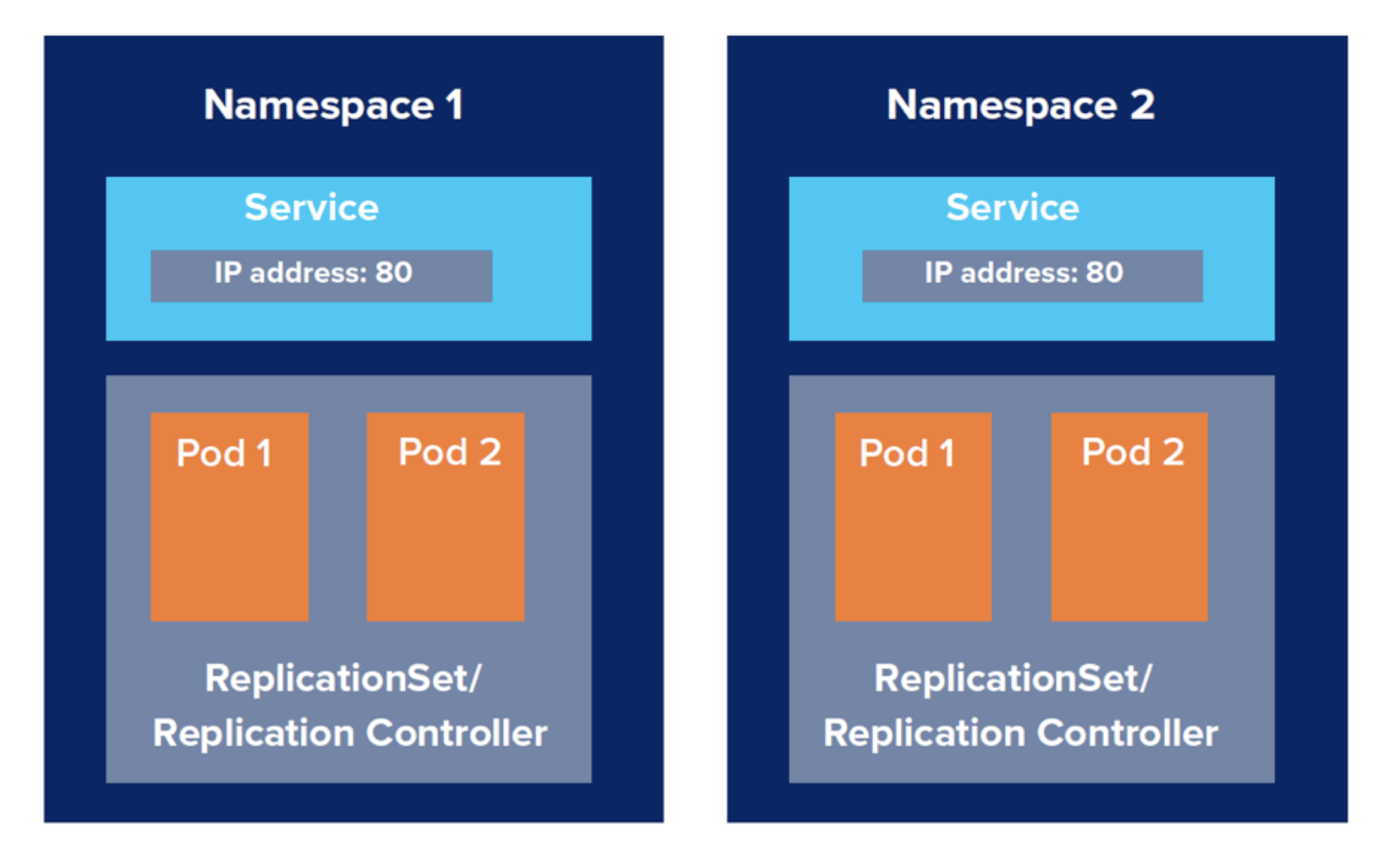
쿠버네티스 Namespace
| Namespace
클러스터를 논리적으로 격리하는 단위
-> Namespace에 각 리소스를 할당해서 관리할 수 있음
Pod, Service, Deployment 등을 하나로 묶어서 Namespace를 만들 수 있음
| Kind
참고자료
https://velog.io/@pinion7/Kubernetes-리소스-Namespace에-대해-이해하고-실습해보기