AWS IAM 실습 - 사용자 및 그룹 권한 관리
https://skillbuilder.aws/learn
=> 로그인을 해주세요!
학습 목표
- IAM 사용자, 그룹, 정책의 개념 이해
- JSON 정책 문서 읽고 해석하기
- 최소 권한 원칙(Least Privilege) 실습
태스크 1: 사용자 및 그룹 살펴보기
IAM 사용자
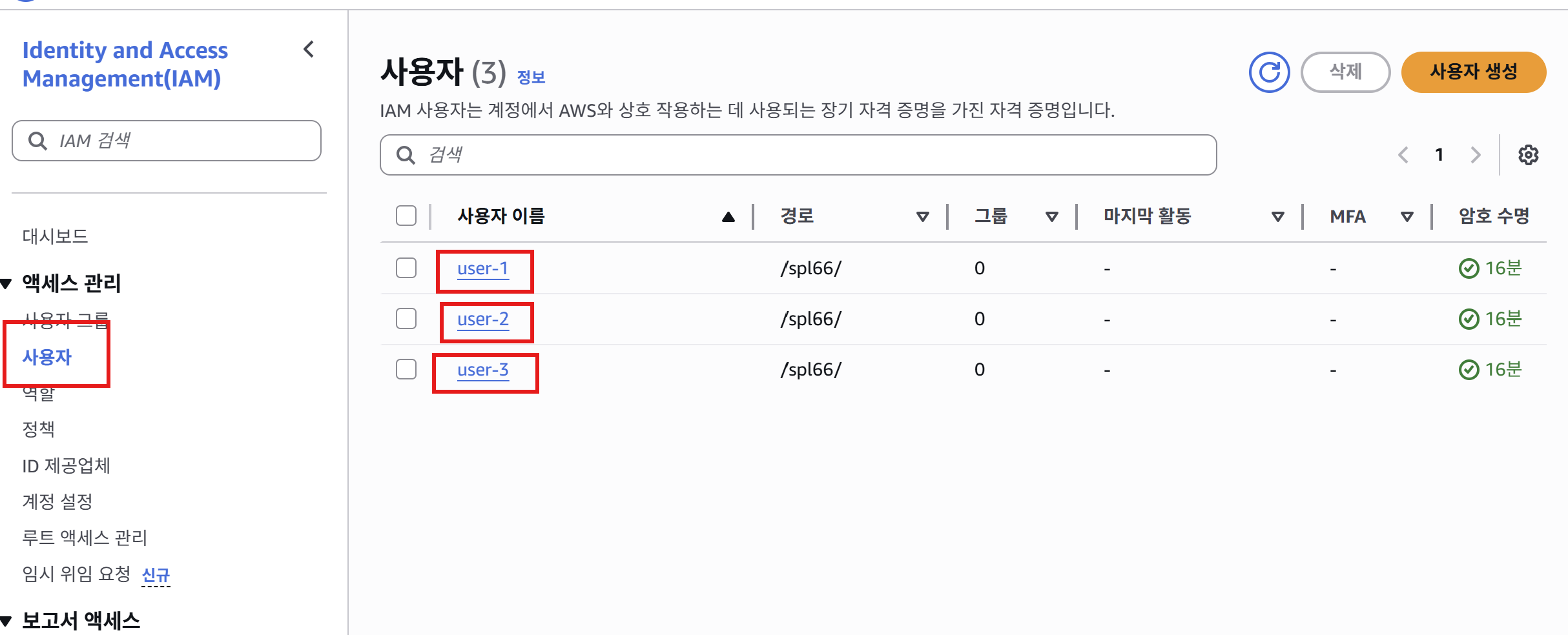
IAM 대시보드에서 3명의 사용자(user-1, user-2, user-3) 확인
User-1 권한 확인
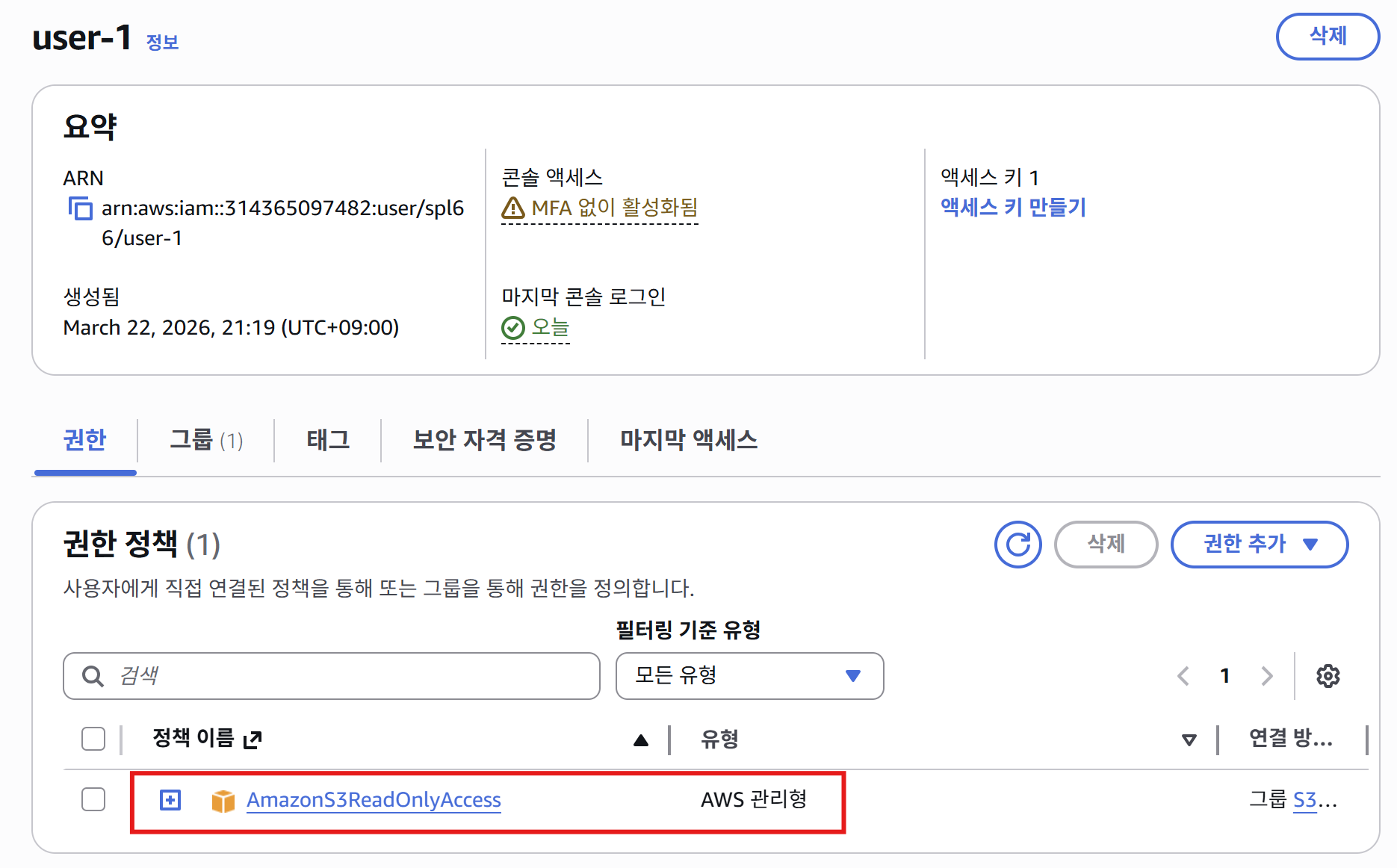
User-1의 권한 탭 - 초기 상태에서는 그룹에 속하지 않아 권한이 없음
- 처음 확인하면, 권한이 없음.
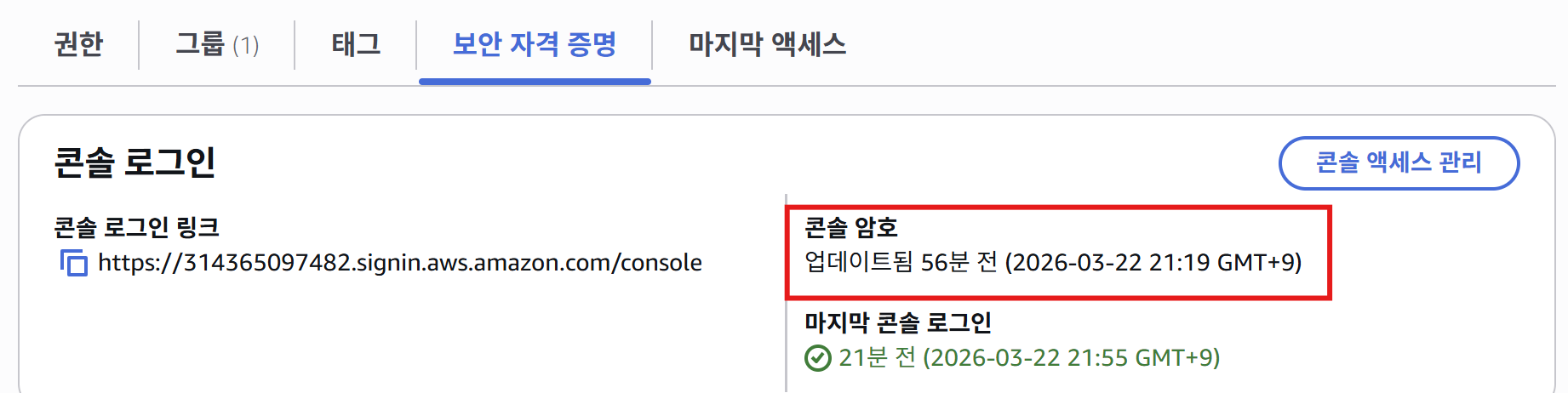
User-1의 보안 자격 증명 탭 - Console Password가 활성화되어 있음
- Console Password가 할당되어 있음.
분석: Console Password 의미
Console Password는 AWS Management Console(웹 브라우저)에 로그인할 수 있는 비밀번호입니다.
- Console Password 있음 → 웹 콘솔 로그인 가능 ✅
- Access Key 없음 → AWS CLI/SDK 사용 불가 ❌
이 사용자는 웹 브라우저로만 AWS에 접근할 수 있도록 설정되어 있습니다.
사용자 그룹
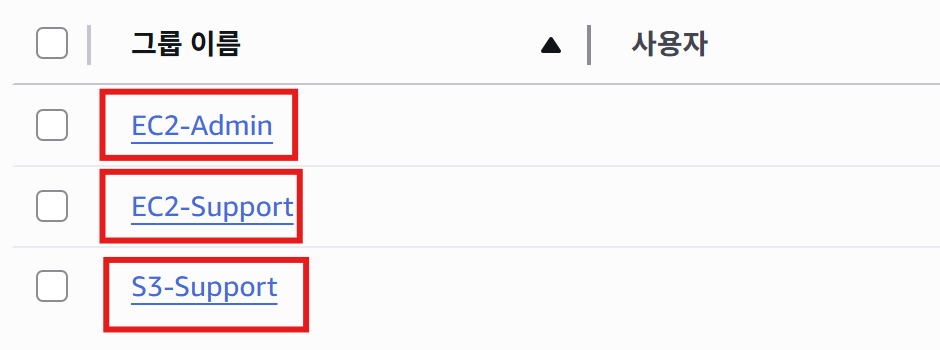
IAM 그룹 목록 - EC2-Admin, EC2-Support, S3-Support 총 3개 그룹 존재
EC2-Admin 그룹
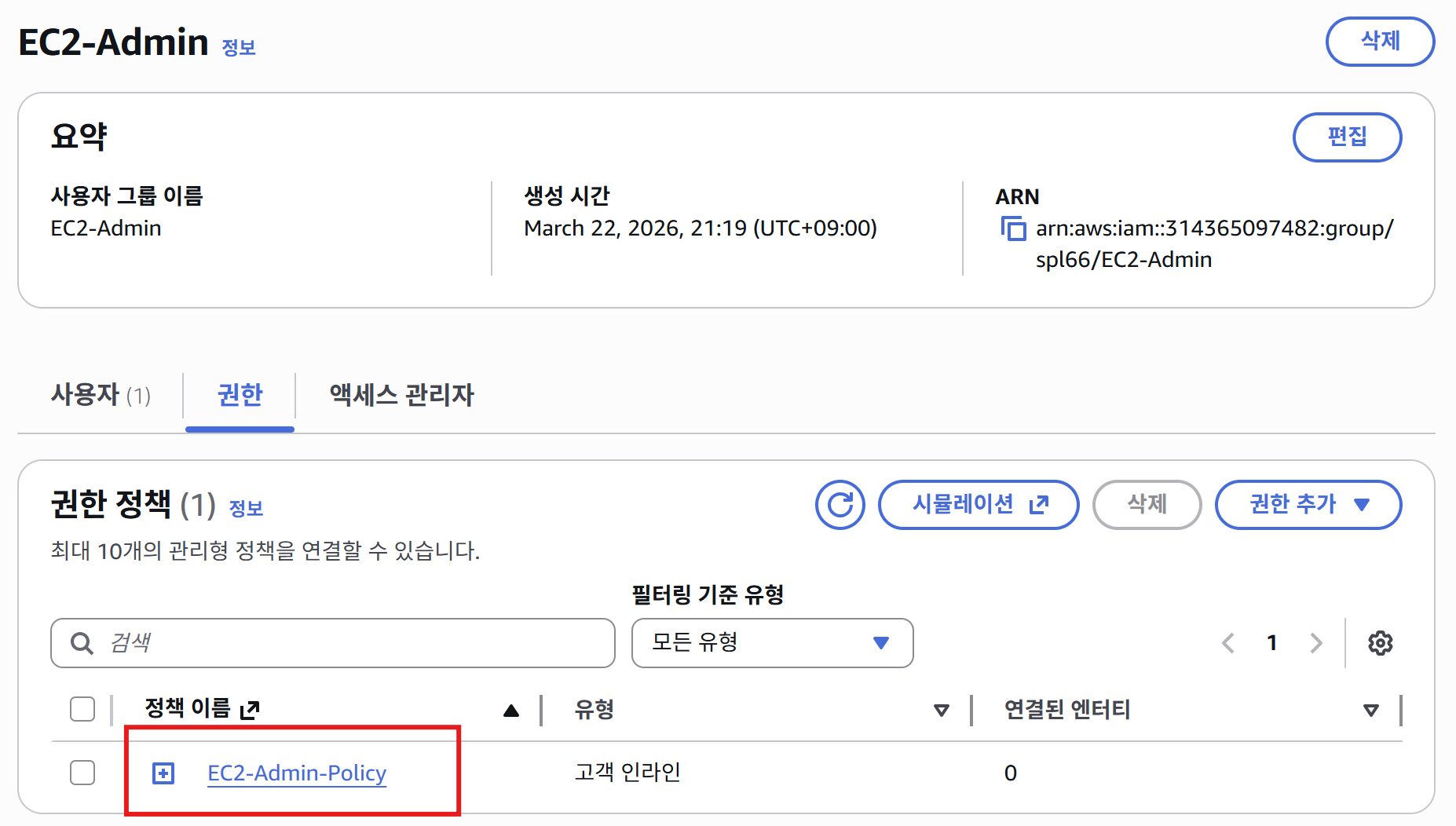
EC2-Admin 그룹 상세 정보 - 사용자 0명, 인라인 정책 1개 (EC2-Admin-Policy)
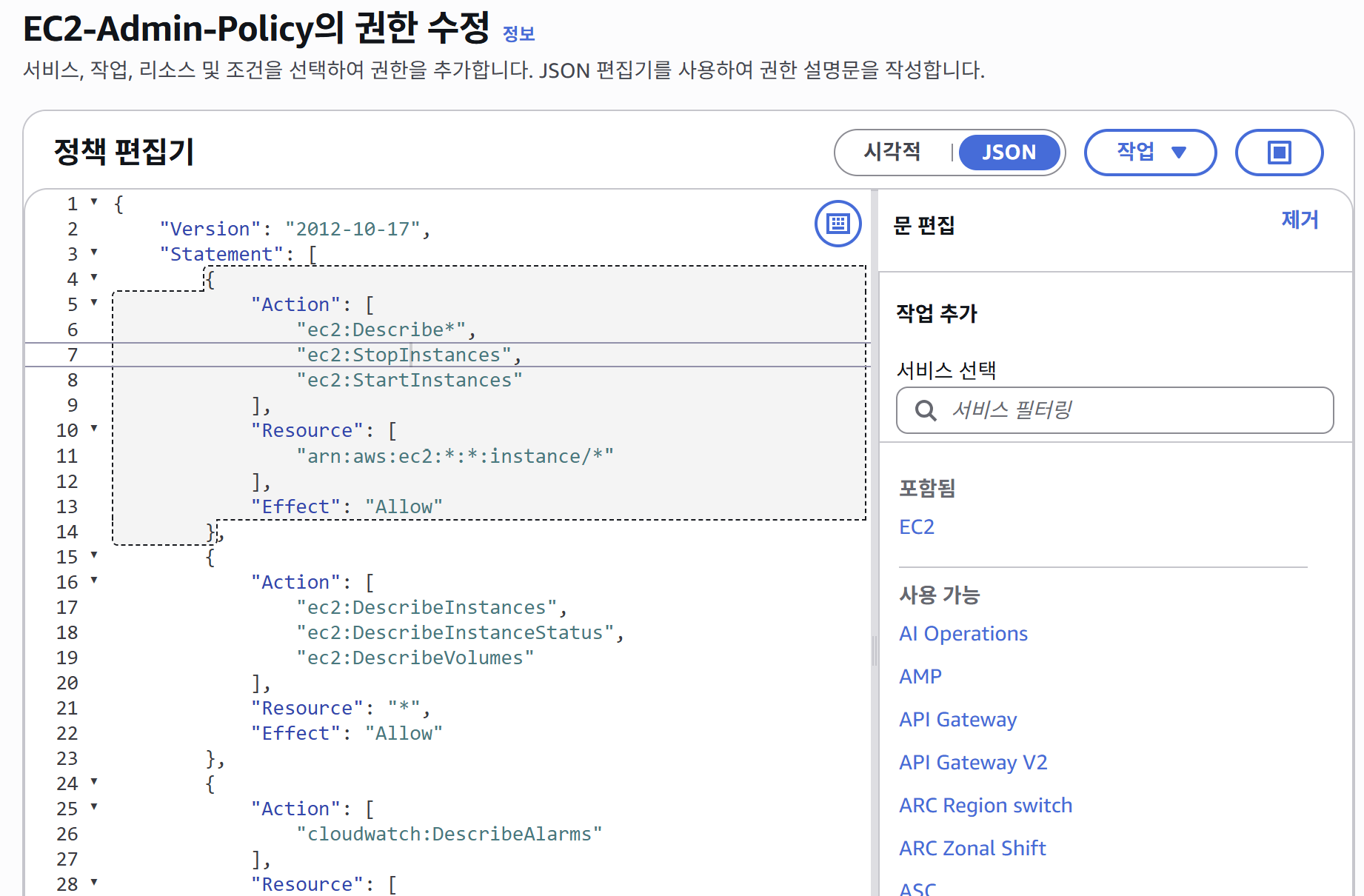
EC2-Admin-Policy JSON 정책 문서 내용
정책 JSON
{
	"Version": "2012-10-17",
	"Statement": [
		{
			"Action": [
				"ec2:Describe*",
				"ec2:StopInstances",
				"ec2:StartInstances"
			],
			"Resource": [
				"arn:aws:ec2:*:*:instance/*"
			],
			"Effect": "Allow"
		},
		{
			"Action": [
				"ec2:DescribeInstances",
				"ec2:DescribeInstanceStatus",
				"ec2:DescribeVolumes"
			],
			"Resource": "*",
			"Effect": "Allow"
		},
		{
			"Action": [
				"cloudwatch:DescribeAlarms"
			],
			"Resource": [
				"arn:aws:cloudwatch:*:*:alarm:*"
			],
			"Effect": "Allow"
		}
	]
}
🔍 정책 해석
정책 요약: EC2 인스턴스를 조회하고, 시작/중지할 수 있는 관리자 권한
Statement 1: EC2 인스턴스 제어 권한
- Action:
ec2:Describe*: 모든 EC2 조회 명령어 허용 (와일드카드*사용)ec2:StopInstances: 인스턴스 중지 권한ec2:StartInstances: 인스턴스 시작 권한
- Resource:
arn:aws:ec2:*:*:instance/*- 첫 번째
*: 모든 리전 (us-east-1, ap-northeast-2 등) - 두 번째
*: 모든 AWS 계정 instance/*: 모든 인스턴스 ID
- 첫 번째
- Effect:
Allow- 위 작업들을 허용
Statement 2: EC2 상세 정보 조회 권한
- Action:
ec2:DescribeInstances: 인스턴스 목록 및 상태 조회ec2:DescribeInstanceStatus: 인스턴스 상태 점검 조회ec2:DescribeVolumes: 연결된 EBS 볼륨 조회
- Resource:
*(모든 리소스) - Effect:
Allow
Statement 3: CloudWatch 알람 조회 권한
- Action:
cloudwatch:DescribeAlarms: CloudWatch 알람 설정 조회
- Resource:
arn:aws:cloudwatch:*:*:alarm:*- 모든 리전, 모든 계정, 모든 알람
- Effect:
Allow
핵심 포인트:
- ✅ 인스턴스 조회 가능
- ✅ 인스턴스 시작/중지 가능
- ❌ 인스턴스 삭제/생성 불가 (권한 없음)
S3-Support 그룹
정책: AmazonS3ReadOnlyAccess
{
    "Version": "2012-10-17",
    "Statement": [
        {
            "Effect": "Allow",
            "Action": [
                "ec2:Describe*",
                "ec2:GetSecurityGroupsForVpc"
            ],
            "Resource": "*"
        },
        {
            "Effect": "Allow",
            "Action": "elasticloadbalancing:Describe*",
            "Resource": "*"
        },
        {
            "Effect": "Allow",
            "Action": [
                "cloudwatch:ListMetrics",
                "cloudwatch:GetMetricStatistics",
                "cloudwatch:Describe*"
            ],
            "Resource": "*"
        },
        {
            "Effect": "Allow",
            "Action": "autoscaling:Describe*",
            "Resource": "*"
        }
    ]
}
🔍 정책 해석
정책 요약: S3 읽기 전용 권한 + 관련 AWS 서비스 조회 권한
Statement 1: EC2 조회 권한
- Action:
ec2:Describe*: 모든 EC2 리소스 조회 (인스턴스, 볼륨, 네트워크 등)ec2:GetSecurityGroupsForVpc: VPC의 보안 그룹 조회
- Resource:
*(모든 리소스) - Effect:
Allow
Statement 2: 로드 밸런서 조회 권한
- Action:
elasticloadbalancing:Describe*: ELB(Elastic Load Balancing) 설정 조회
- Resource:
* - Effect:
Allow
Statement 3: CloudWatch 메트릭 조회 권한
- Action:
cloudwatch:ListMetrics: 사용 가능한 메트릭 목록 조회cloudwatch:GetMetricStatistics: 메트릭 통계 데이터 조회cloudwatch:Describe*: CloudWatch 리소스 조회
- Resource:
* - Effect:
Allow
Statement 4: Auto Scaling 조회 권한
- Action:
autoscaling:Describe*: Auto Scaling 그룹 및 정책 조회
- Resource:
* - Effect:
Allow
핵심 포인트:
- ✅ S3 버킷 및 객체 읽기 가능 (실제 S3 권한은 AWS 관리형 정책에 포함됨)
- ✅ 관련 서비스 조회 가능 (EC2, ELB, CloudWatch, Auto Scaling)
- ❌ S3 객체 쓰기/삭제 불가 (읽기 전용)
- ❌ EC2 인스턴스 제어 불가 (조회만 가능)
EC2-Support 그룹
정책: EC2-Support-Policy (실제로는 EC2 읽기 전용)
{
	"Version": "2012-10-17",
	"Statement": [
		{
			"Action": [
				"ec2:Describe*",
				"ec2:GetConsole*"
			],
			"Resource": "*",
			"Effect": "Allow"
		},
		{
			"Action": [
				"cloudwatch:DescribeAlarms",
				"cloudwatch:GetMetricStatistics"
			],
			"Resource": "*",
			"Effect": "Allow"
		}
	]
}
🔍 정책 해석
정책 요약: EC2 읽기 전용 권한 (조회만 가능, 제어 불가)
Statement 1: EC2 조회 및 콘솔 접근 권한
- Action:
ec2:Describe*: 모든 EC2 리소스 조회 (인스턴스, 볼륨, 스냅샷 등)ec2:GetConsole*: EC2 콘솔 스크린샷 및 로그 조회
- Resource:
*(모든 리소스) - Effect:
Allow
Statement 2: CloudWatch 모니터링 권한
- Action:
cloudwatch:DescribeAlarms: 알람 설정 조회cloudwatch:GetMetricStatistics: 성능 메트릭 조회
- Resource:
* - Effect:
Allow
핵심 포인트:
- ✅ EC2 인스턴스 조회 가능 (목록, 상태, 스크린샷)
- ❌ 인스턴스 시작/중지/삭제 불가 (읽기 전용!)
- ✅ CloudWatch 메트릭 조회 가능
- ❌ CloudWatch 알람 생성/수정 불가
EC2-Admin vs EC2-Support 차이:
- EC2-Admin:
ec2:StartInstances,ec2:StopInstances포함 ✅ 제어 가능 - EC2-Support:
ec2:Describe*만 포함 ❌ 조회만 가능
태스크 2: 비즈니스 시나리오
나머지 실습에서는 이러한 사용자와 그룹을 사용하여 다음 비즈니스 시나리오를 지원하는 권한을 활성화합니다.
회사는 Amazon Web Services의 사용을 확대하고 있으며, Amazon EC2 인스턴스와 Amazon S3 스토리지를 상당히 많이 사용하고 있습니다. 여러분은 신규 직원들에게 직무에 따른 액세스 권한을 부여하고자 합니다.
권한 매트릭스
| 사용자 | 소속 그룹 | 권한 |
|---|---|---|
| user-1 | S3-Support | Amazon S3 읽기 전용 액세스 |
| user-2 | EC2-Support | Amazon EC2 읽기 전용 액세스 |
| user-3 | EC2-Admin | Amazon EC2 인스턴스 보기, 시작, 중지 |
S3-Support 그룹에 user-1 추가하기
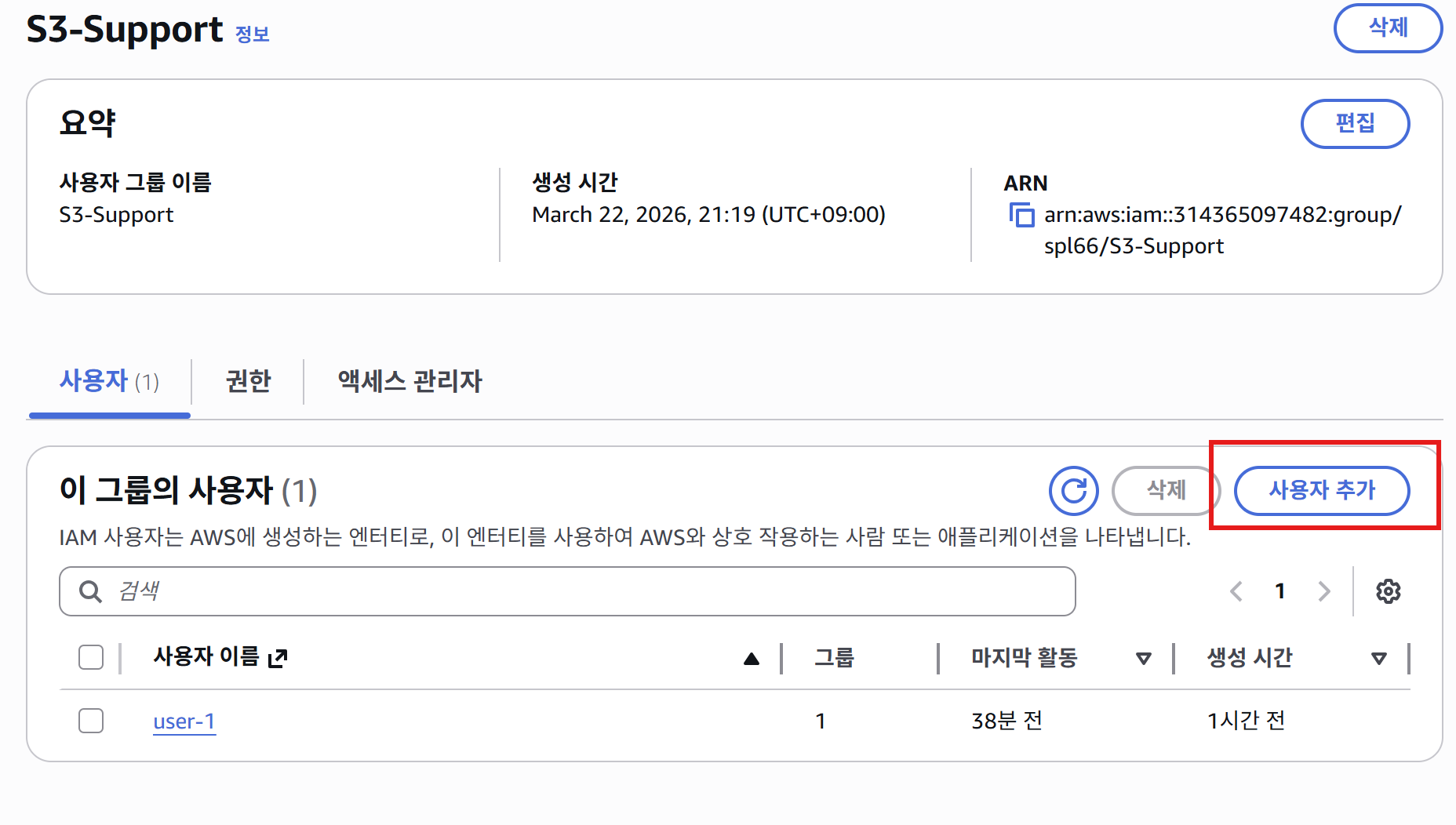
IAM 그룹에 사용자 추가 화면 - S3-Support 그룹에 user-1 추가 중
- 사용자를 그룹에 추가하여 권한 부여
같은 방법으로:
- EC2-Support 그룹에 user-2 추가
- EC2-Admin 그룹에 user-3 추가
태스크 3: 로그인 및 사용자 테스트
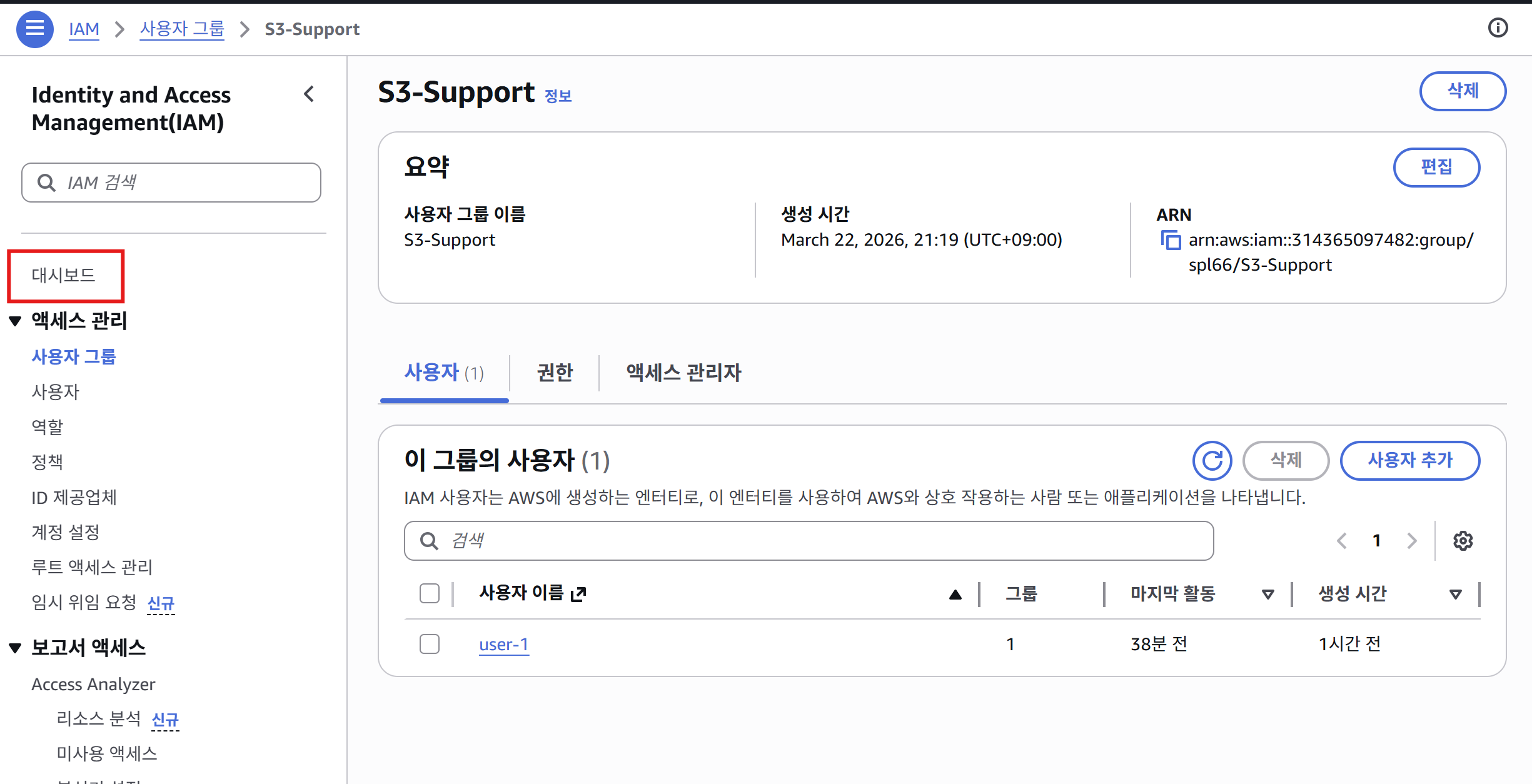
IAM 대시보드 - 로그인 URL 확인 위치
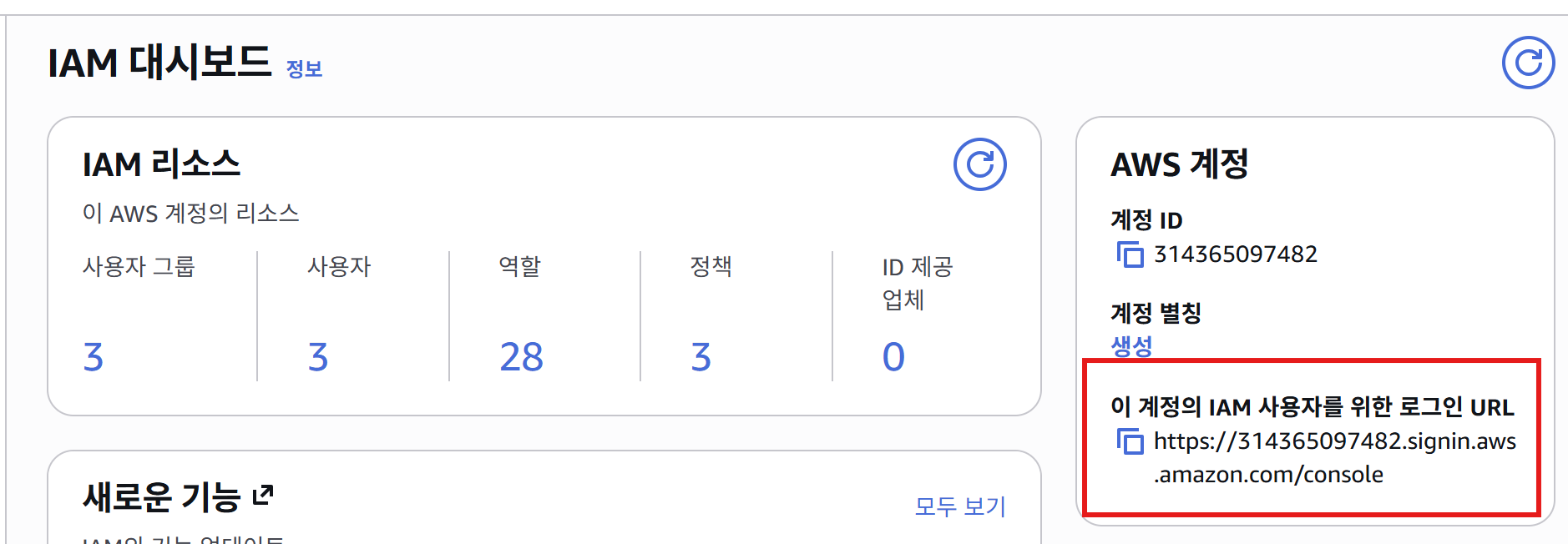
IAM 사용자 로그인 URL - 계정 ID가 포함된 전용 로그인 페이지
중요: 반드시 프라이빗 창(시크릿 모드)으로 열기
- 이유: 기존 AWS 관리자 세션과 충돌 방지
User-1 로그인 (S3-Support)
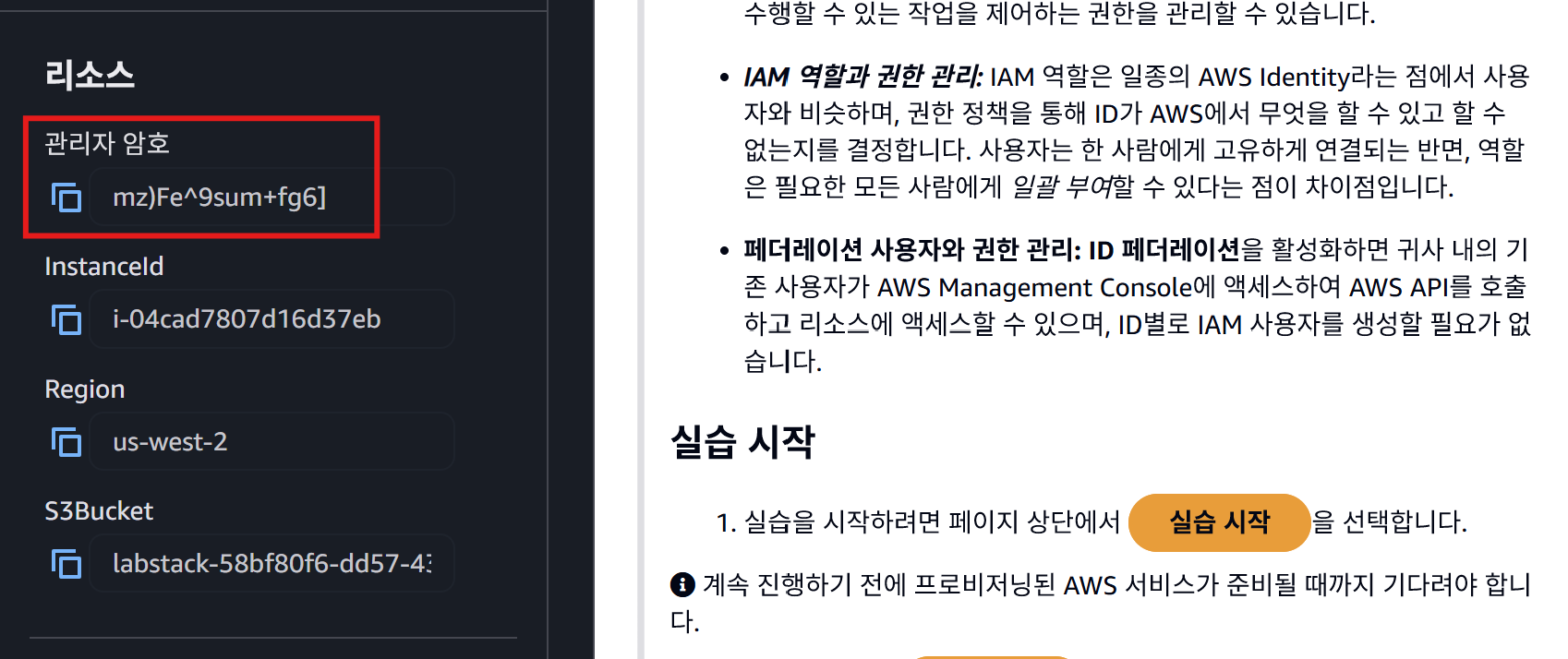
User-1 로그인 화면 - 사용자 이름과 관리자가 설정한 초기 비밀번호 입력
User-1 비밀번호 변경 화면 - 초기 로그인 시 새 비밀번호 설정 필요
실습 환경 설정:
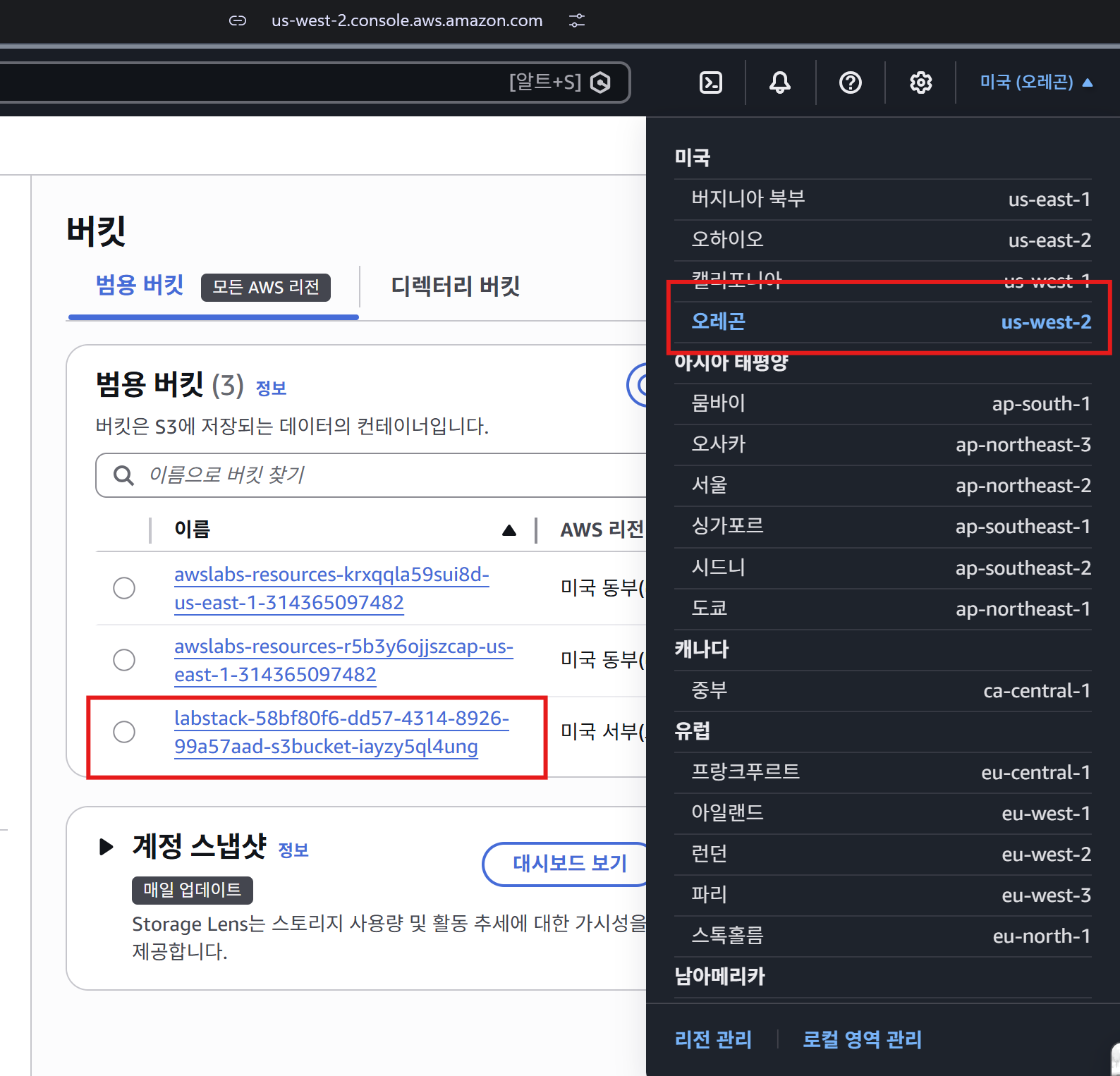
- 리전: us-west-2 (Oregon)
- S3 버킷 이름:
labstack-58bf80f6-dd57-4314-8926-99a57aad-s3bucket-iayzy5ql4ung
S3 버킷 접근 테스트
User-1의 S3 버킷 접근 성공 - S3-Support 그룹 권한으로 버킷 목록 및 객체 조회 가능
결과:
- ✅ S3 버킷 조회 성공 (읽기 전용 권한)
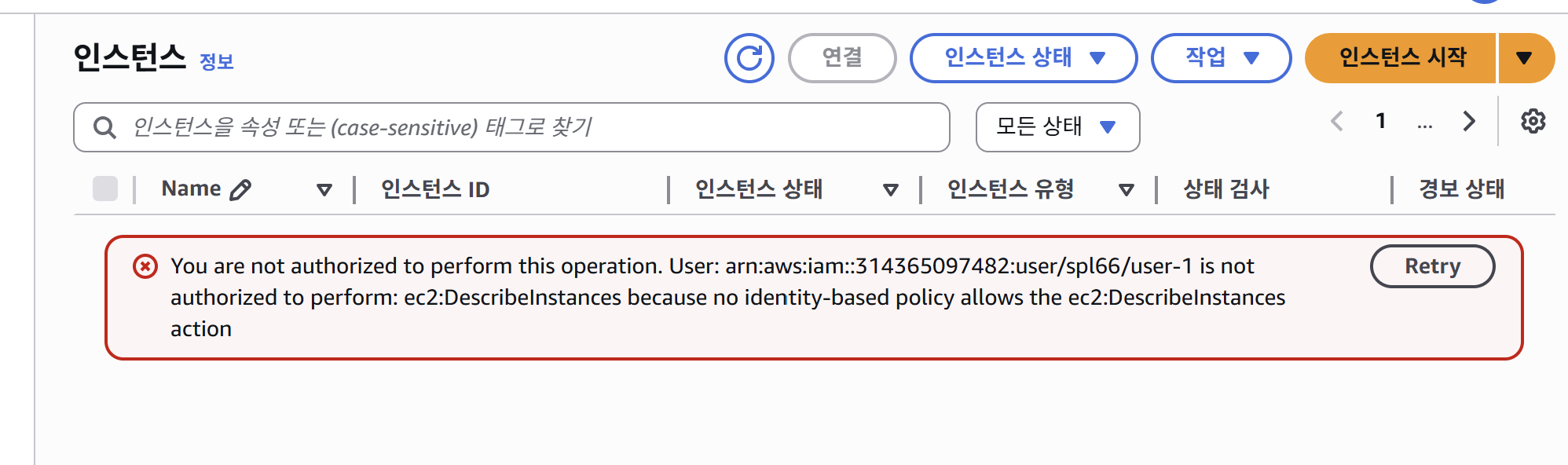
- ❌ EC2 콘솔 접근 거부 (권한 없음)
왜 EC2는 못 볼까?
- user-1은 S3-Support 그룹만 소속
- S3-Support 그룹은 S3 읽기 권한만 있음
- EC2 관련 권한은 EC2-Support, EC2-Admin 그룹에만 있음
User-2 로그인 (EC2-Support)
EC2 인스턴스 조회 테스트
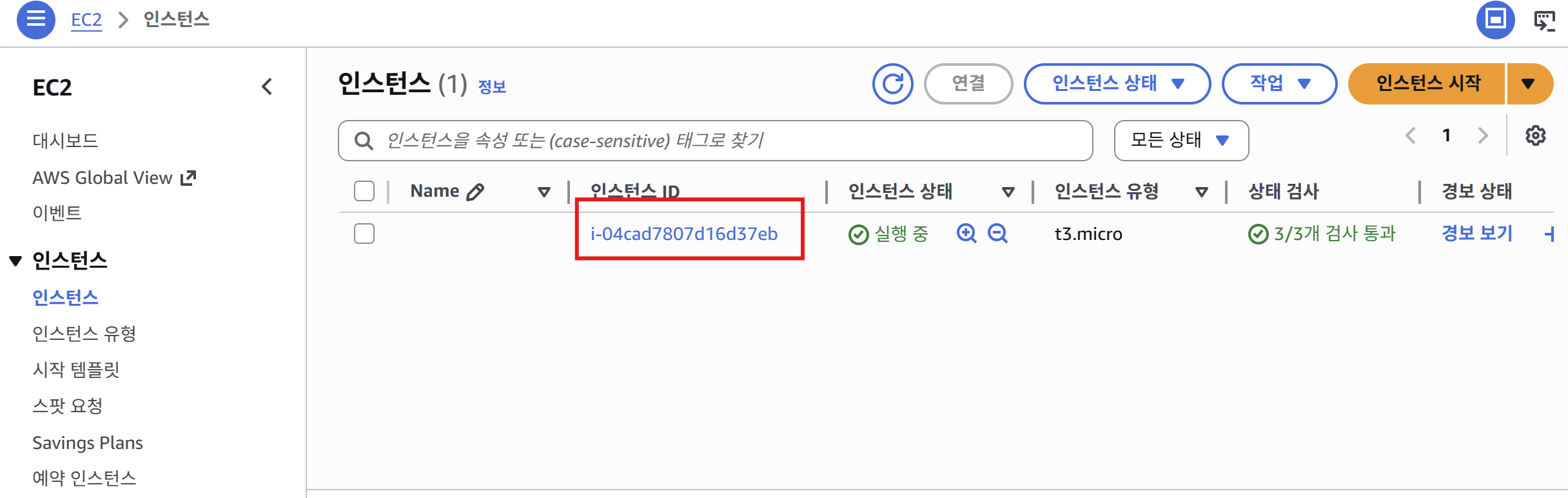
User-2의 EC2 인스턴스 목록 조회 성공 - 인스턴스 ID: i-04cad7807d16d37eb 확인
결과: ✅ EC2 인스턴스 조회 성공 (읽기 전용 권한)
EC2 인스턴스 중지 시도
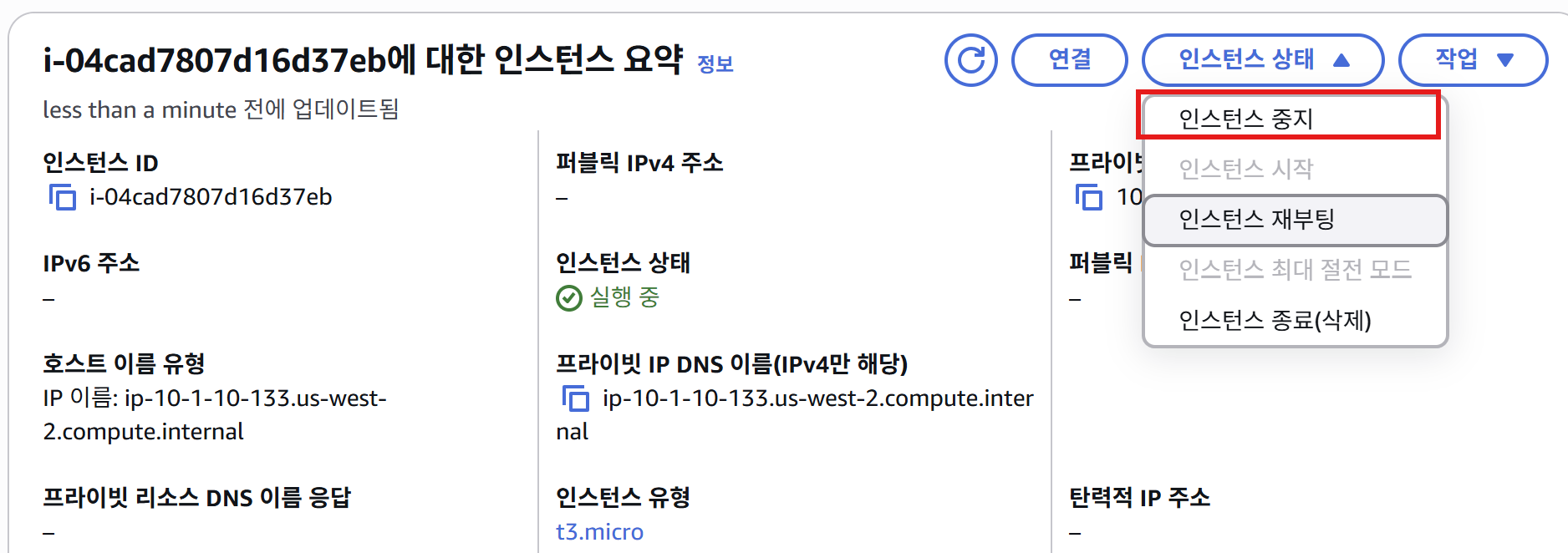
User-2가 인스턴스 중지 시도 - "인스턴스 중지" 버튼 클릭
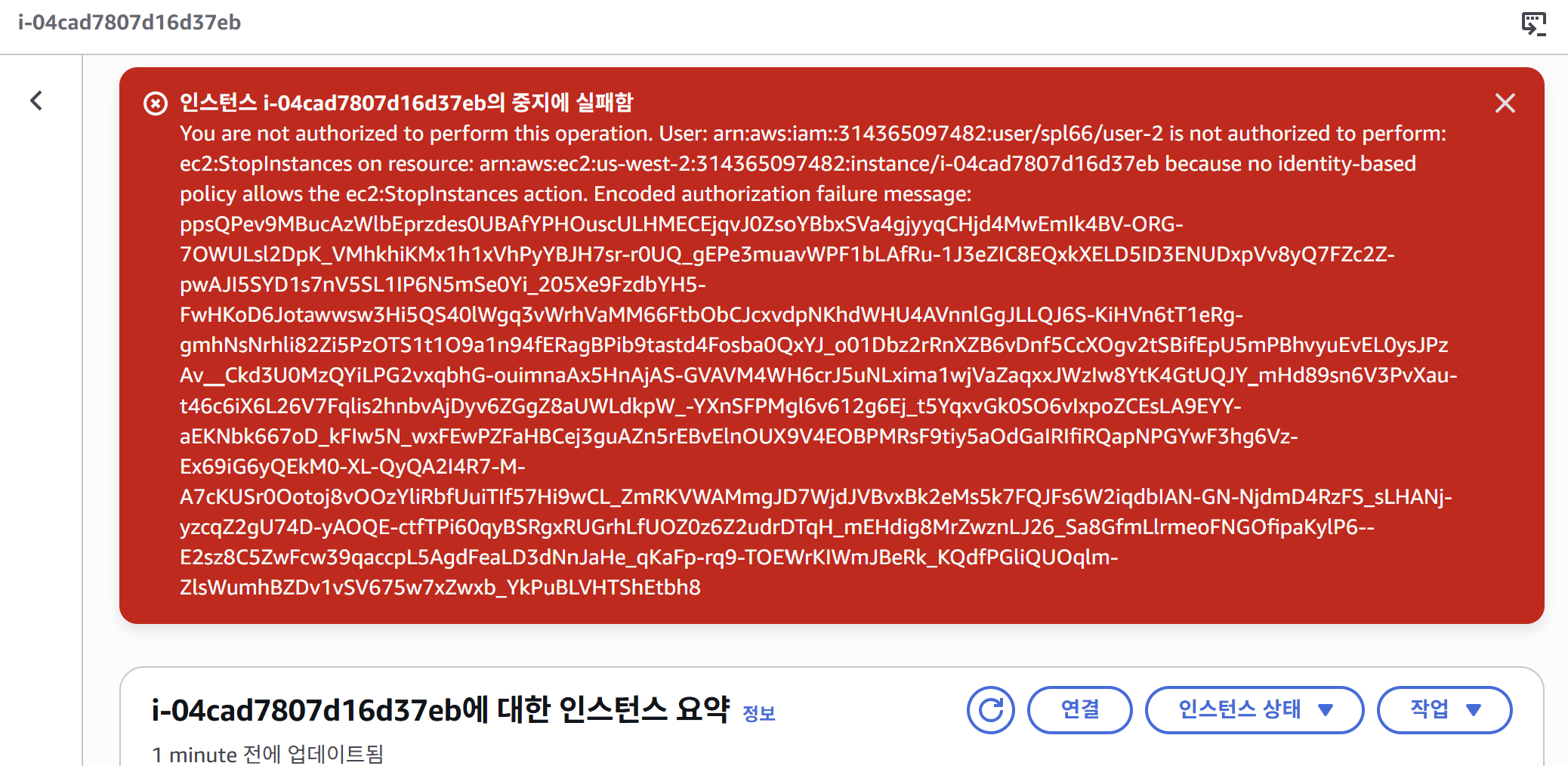
인스턴스 중지 실패 - 권한 거부 오류 메시지 표시
🔍 오류 메시지 분석
핵심 오류:
You are not authorized to perform this operation.
User: arn:aws:iam::314365097482:user/spl66/user-2
is not authorized to perform: ec2:StopInstances
on resource: arn:aws:ec2:us-west-2:314365097482:instance/i-04cad7807d16d37eb
because no identity-based policy allows the ec2:StopInstances action.
해석:
- 사용자:
user-2(EC2-Support 그룹 소속) - 시도한 작업:
ec2:StopInstances(인스턴스 중지) - 대상 리소스: 인스턴스
i-04cad7807d16d37eb(us-west-2 리전) - 실패 이유: EC2-Support 그룹은 읽기 전용 권한만 있음
ec2:Describe*(조회) ✅ 허용ec2:StopInstances(중지) ❌ 거부
왜 user-3은 성공했을까?
- user-3은 EC2-Admin 그룹 소속
- EC2-Admin-Policy에
ec2:StopInstances권한 포함 - 따라서 동일한 인스턴스를 중지할 수 있음
Encoded authorization failure message:
ppsQPev9MBucAzWlbEprzdes0UBAfYPHOuscULHMECEjqvJ0ZsoYBbxSVa4gjyyqCHjd4MwEmIk4BV-ORG-7OWULsl2DpK_VMhkhiKMx1h1xVhPyYBJH7sr-r0UQ_gEPe3muavWPF1bLAfRu-1J3eZIC8EQxkXELD5ID3ENUDxpVv8yQ7FZc2Z-pwAJI5SYD1s7nV5SL1IP6N5mSe0Yi_205Xe9FzdbYH5-FwHKoD6Jotawwsw3Hi5QS40lWgq3vWrhVaMM66FtbObCJcxvdpNKhdWHU4AVnnlGgJLLQJ6S-KiHVn6tT1eRg-gmhNsNrhli82Zi5PzOTS1t1O9a1n94fERagBPib9tastd4Fosba0QxYJ_o01Dbz2rRnXZB6vDnf5CcXOgv2tSBifEpU5mPBhvyuEvEL0ysJPzAv__Ckd3U0MzQYiLPG2vxqbhG-ouimnaAx5HnAjAS-GVAVM4WH6crJ5uNLxima1wjVaZaqxxJWzIw8YtK4GtUQJY_mHd89sn6V3PvXau-t46c6iX6L26V7Fqlis2hnbvAjDyv6ZGgZ8aUWLdkpW_-YXnSFPMgl6v612g6Ej_t5YqxvGk0SO6vIxpoZCEsLA9EYY-aEKNbk667oD_kFIw5N_wxFEwPZFaHBCej3guAZn5rEBvElnOUX9V4EOBPMRsF9tiy5aOdGaIRIfiRQapNPGYwF3hg6Vz-Ex69iG6yQEkM0-XL-QyQA2I4R7-M-A7cKUSr0Ootoj8vOOzYliRbfUuiTIf57Hi9wCL_ZmRKVWAMmgJD7WjdJVBvxBk2eMs5k7FQJFs6W2iqdbIAN-GN-NjdmD4RzFS_sLHANj-yzcqZ2gU74D-yAOQE-ctfTPi60qyBSRgxRUGrhLfUOZ0z6Z2udrDTqH_mEHdig8MrZwznLJ26_Sa8GfmLlrmeoFNGOfipaKylP6--E2sz8C5ZwFcw39qaccpL5AgdFeaLD3dNnJaHe_qKaFp-rq9-TOEWrKIWmJBeRk_KQdfPGliQUOqlm-ZlsWumhBZDv1vSV675w7xZwxb_YkPuBLVHTShEtbh8
- 상세한 권한 거부 사유가 암호화되어 있음
- 디코딩하려면
aws sts decode-authorization-message명령어 필요
S3 버킷 접근 테스트
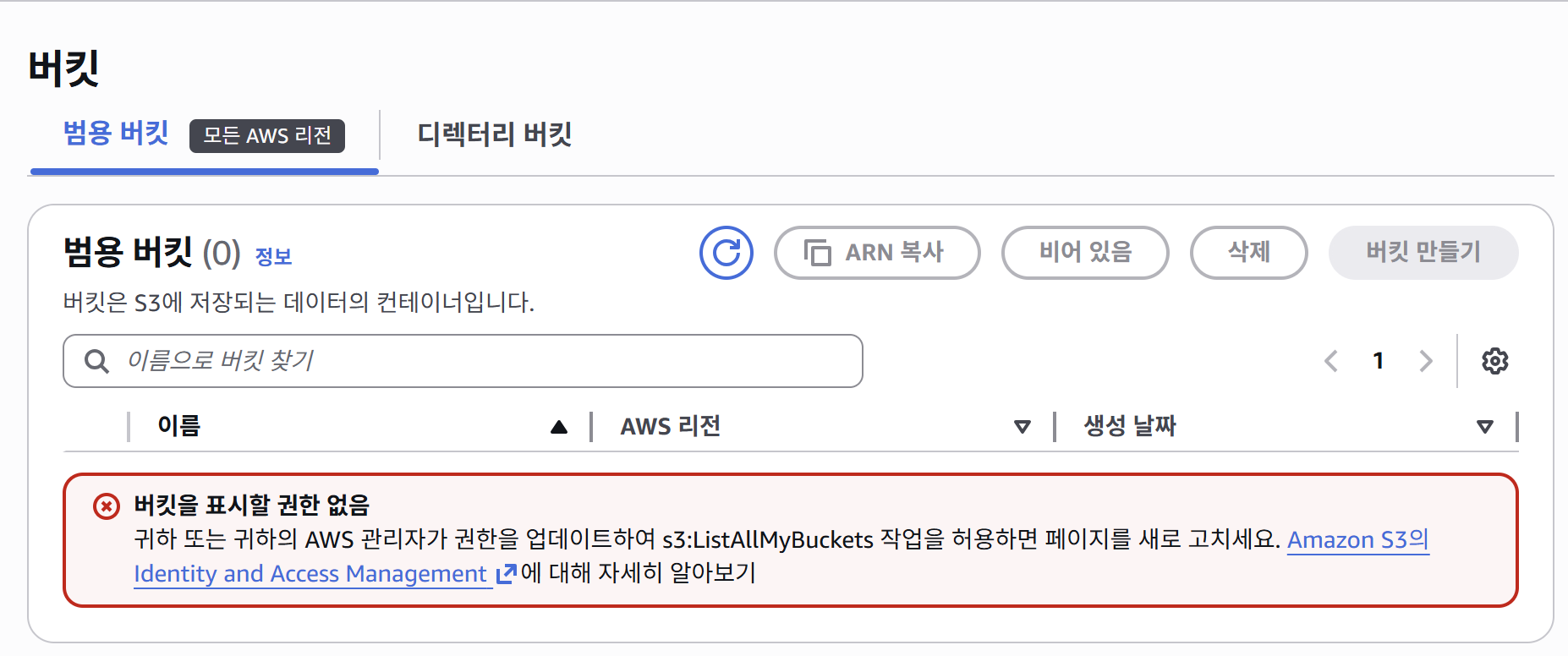
User-2의 S3 버킷 접근 거부 - EC2-Support 그룹은 S3 권한 없음
결과: ❌ S3 버킷 접근 실패 (권한 없음)
User-3 로그인 (EC2-Admin)
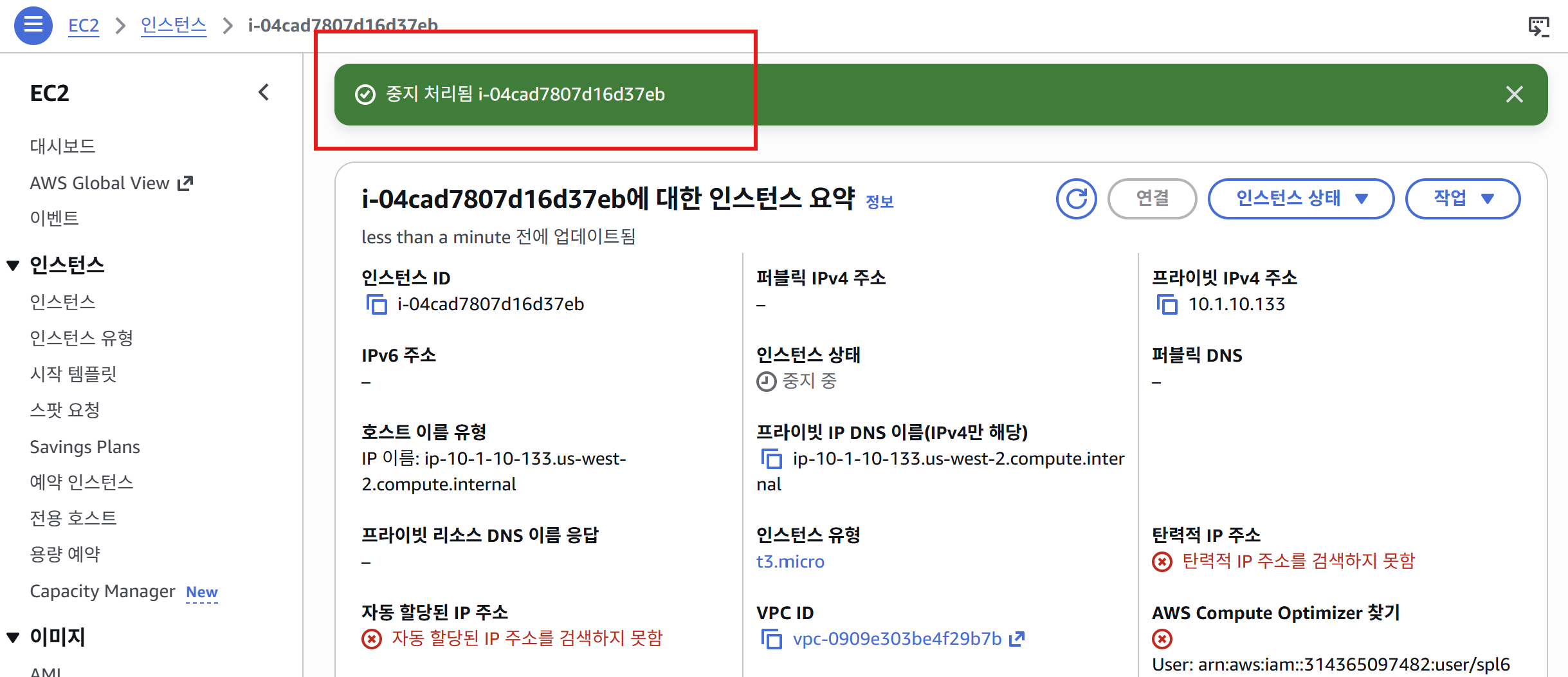
User-3의 인스턴스 중지 성공 - EC2-Admin 그룹 권한으로 인스턴스 제어 가능
결과:
- ✅ EC2 인스턴스 조회 성공
- ✅ EC2 인스턴스 중지 성공 (EC2-Admin 권한)
- ✅ EC2 인스턴스 시작 가능 (EC2-Admin 권한)
학습 정리
핵심 개념
-
IAM 사용자: AWS 리소스에 접근하는 개별 계정
- Console Password: 웹 콘솔 로그인용 비밀번호
- Access Key: CLI/SDK 접근용 자격 증명
-
IAM 그룹: 동일한 권한을 가진 사용자 모음
- 사용자를 그룹에 추가하면 그룹의 정책이 자동으로 적용됨
- 한 사용자가 여러 그룹에 속할 수 있음
-
IAM 정책: JSON 형식으로 권한을 정의하는 문서
- AWS 관리형 정책: AWS가 제공, 수정 불가 (예: AmazonS3ReadOnlyAccess)
- 인라인 정책: 사용자/그룹/역할에 직접 생성한 정책
실습에서 배운 점
| 사용자 | 그룹 | S3 읽기 | EC2 조회 | EC2 제어 |
|---|---|---|---|---|
| user-1 | S3-Support | ✅ | ❌ | ❌ |
| user-2 | EC2-Support | ❌ | ✅ | ❌ |
| user-3 | EC2-Admin | ❌ | ✅ | ✅ (시작/중지) |
최소 권한 원칙 (Least Privilege):
- 각 사용자에게 업무 수행에 필요한 최소한의 권한만 부여
- user-2는 EC2를 조회할 수 있지만, 실수로 인스턴스를 중지할 수 없음
- user-3만 EC2 인스턴스를 제어할 수 있는 관리자 권한 보유
주요 JSON 필드 정리
| 필드 | 설명 | 예시 |
|---|---|---|
Version |
AWS 정책 언어 버전 | 2012-10-17 (최신 버전) |
Statement |
권한 규칙 배열 | [{...}, {...}] |
Effect |
허용/거부 여부 | Allow 또는 Deny |
Action |
허용/거부할 AWS API 작업 | ec2:Describe*, s3:GetObject |
Resource |
대상 AWS 리소스 | * (모두) 또는 arn:aws:... |
와일드카드 (*) 의미:
ec2:Describe*: ec2로 시작하는 모든 Describe 작업 (DescribeInstances, DescribeVolumes 등)Resource: "*": 모든 리소스에 적용arn:aws:ec2:*:*:instance/*: 모든 리전, 모든 계정, 모든 인스턴스
복습 문제
Question 1
Multiple Choice
Answer status:
Incorrect
Question
Which of the following is a benefit of using IAM Roles?
Answer options
| Option | Correct answer | Your selection | Rationale |
|---|---|---|---|
| They grant permissions without sharing long-term access keys | Correct | Not selected | This is correct. IAM Roles allow you to grant permissions to entities without sharing long-term access keys, improving security. |
| They automatically scale your AWS resources | Incorrect | Selected | IAM Roles are not related to scaling resources; this is typically handled by services like Auto Scaling. |
| They allow you to avoid using IAM users | Incorrect | Not selected | While Roles can reduce the need for some IAM users, they don't completely replace the need for IAM users. |
| They provide permanent credentials | Incorrect | Not selected | IAM Roles provide temporary credentials, not permanent ones. |
Question 2
Multiple Choice
Answer status:
Correct
Question
Which of the following best describes the principle of least privilege in IAM?
Answer options
| Option | Correct answer | Your selection | Rationale |
|---|---|---|---|
| Granting users only the permissions they need to perform their tasks | Correct | Selected | This is correct. The principle of least privilege involves giving users only the permissions necessary for their specific roles. |
| Denying all permissions by default | Incorrect | Not selected | While IAM does deny by default, the principle of least privilege is about granting necessary permissions, not denying all. |
| Sharing admin credentials among all users | Incorrect | Not selected | This is a security risk and goes against AWS best practices. |
| Granting users all possible permissions | Incorrect | Not selected | This goes against the principle of least privilege and can pose security risks. |
Question 3
Multiple Choice
Answer status:
Correct
Question
What type of IAM policy is managed by AWS and cannot be modified by users?
Answer options
| Option | Correct answer | Your selection | Rationale |
|---|---|---|---|
| AWS managed policy | Correct | Selected | AWS managed policies are created and managed by AWS. They are designed for common use cases and cannot be modified by users. |
| Group policy | Incorrect | Not selected | Group policies can be either inline or managed policies attached to a group, and can be modified by users with appropriate permissions. |
| Inline policy | Incorrect | Not selected | Inline policies are created and managed by users, embedded directly in a single user, group, or role. |
| Customer managed policy | Incorrect | Not selected | Customer managed policies are created and managed by users, offering more flexibility than AWS managed policies. |
Question 4
Multiple Choice
Answer status:
Correct
Question
What does IAM use to define permissions for users, groups, and roles?
Answer options
| Option | Correct answer | Your selection | Rationale |
|---|---|---|---|
| Policies | Correct | Selected | IAM uses policies to define permissions. These are JSON documents that specify what actions are allowed or denied on what AWS resources. |
| Scripts | Incorrect | Not selected | While scripts can be used to automate IAM tasks, they are not used to define permissions directly. |
| Certificates | Incorrect | Not selected | Certificates are used for authentication and encryption, not for defining permissions in IAM. |
| Templates | Incorrect | Not selected | Templates might be used in other AWS services, but IAM specifically uses policies to define permissions. |
Question 5
Multiple Choice
Answer status:
Incorrect
Question
A company wants to allow their employees to use their existing corporate credentials to access AWS resources. Which IAM feature should they implement?
Answer options
| Option | Correct answer | Your selection | Rationale |
|---|---|---|---|
| Identity Federation | Correct | Not selected | Identity Federation allows users to access AWS resources using their existing corporate credentials, which is the requirement in this scenario. |
| IAM Groups | Incorrect | Selected | IAM Groups are used to organize IAM Users and manage permissions collectively, not for external authentication. |
| IAM Roles | Incorrect | Not selected | While IAM Roles can be used with federated users, they don't provide the authentication mechanism itself. |
| IAM Users | Incorrect | Not selected | IAM Users are individual identities created within AWS, not suitable for using existing corporate credentials. |